© 2026
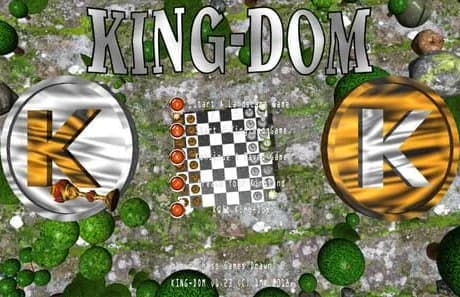
A two-player online (choose an opponent from your Steam friends list) Chess, in an edgeless landscape called "Kingland", with upgrades.
"How about a nice game of Chess ... Weaponised?"
"Verily, A Gameth That Hath The Familiar ... And Yet Also, The Not-So !-)"
PC 64-bit, Windows 7+, DirectX 11, shader model 4.0, full-screen/windowed.
A TWO-PLAYER ONLY online (choose an opponent from your Steam friends list) Chess, in an edgeless landscape called "Kingland", with upgrades. You can choose to play a traditional game of Chess (choose landscape size "Chess"), or enhanced Chess in one of nine million procedurally-generated landscapes. Koins can be collected, to purchase reinforcements, and bombs retrieved, to toss at the enemy! Cheese can be picked up to replenish pieces' energy levels. You can use one Rook to build board square paths across empty landscape, and two corner Rooks to enclose and fill rectangular areas, to claim territory and "magically mine", or "pop-up", goodies from Kingland. You can move your King inside a Rook to beat a hasty retreat. Knights can perform a double move (two of the standard moves in one). Etc.
The game is not officially early release, but please do not assume that means no further development will occur. Please see the Facebook page for current and future additions. If you don't like something, or have suggestions you would like to see, or the game does not function correctly on your particular machine or graphics card, please email me first, rather than instantly posting a negative review. In the case of bugs, please include a screenshot where possible.
You may notice, I haven't specified minimum hardware requirements. Apologies. Me is very, very software, but not at all hardware, so I dunno. Hopefully it helps if I list my PC's specs ?-)
Acer Predator G5900
Intel Core i5 CPU 650 3.2 GHz
8GB DDR3 RAM
NVIDIA GeForce GT 340
Windows 10 64-bit x64
Update (18/3/19):
It runs plenty-fast on me old machine, but now also have a new PC:
Intel Pentium CPU G4560 3.5 GHz
8GB DDR4 RAM 2400 MHz
NVIDIA GeForce GTX 1050 Ti
Windows 10 64-bit x64
And, yes, me is very, very, very happy with how Kingland runs there !-)
Also, I can actually record actual videos of King-Dom with me new machine … will be posting a proper one this week ...
First, both players (Steam friends) must be running Kingdom to start a game. There are two start game options listed first on the title screen, Landscape (procedurallly-generated map) and Kingland (as saved by the editor).
Whomever is to be player One, and thus have the first move in the game, then does this:
press Start Landscape Game
choose a landscape number and type: click on a digit's top half to increase it, or bottom to decrease
select the pre-arranged opponent from your Steam friends list, and press PLAY to send the invitation
or
press Start Kingland Game
choose from your list of editor-saved (or downloaded) Kinglands
select the pre-arranged opponent from your Steam friends list, and press PLAY to send the invitation
Meanwhile, back at the player TWO ranch:
Next, the selected Landscape will be terraformed, or the Kingland transferred. This will take a little while, but the result will be cached to hard-drive, for instant future playing (eg: when load a saved game). The game comes with "000000" Chess, Standard and Big landscapes pre-saved.
The remaining options on the title screen are: load a previously saved game (either type), start the Kingland Konstruction Kit (editor), and Quit !-)
There are four landscape sizes:
Chess (no enhanced game options are enabled - only flat terrain permitted)
Standard = 64 x 64 board squares
Big = 128 x 128
Massive = 256 x 256
There are three landscape terrains:
Generally Flat
Undulatingly Hilly
Toweringly Mountainous
There are one million initial seed numbers for the procedurally-generated landscapes.
Thus this gives 9 million different landscape permutations (for playing King-Dom), and one million very similar Chess boards (for playing standard Chess).
Simpy point at the center of the base of a piece, and LMB to select it, then point at a valid board square to perform a move (green cursor).
You can press the RMB, and move the mouse, to rotate the camera, and the mouse wheel zooms in and out of your selected piece.
Keys 'Z' and 'X' can be used to cycle through your pieces.
The save game button at screen center right is available when it is your move, and obviously causes both player's machines to save the current state of play.
At the screen lower right is a "Draw" button which causes the battle to be declared a draw if both players have pressed it.
The screen lower center shows camera direction and angle buttons, when you are not in the shop.
The rest of the details here pertain to (enhanced) King-Dom, not (traditional) Chess ...
To build a straight line of board squares using your selected Rook, just point at where the final board square of your intended path would be, and press LMB to build it. Or yo
No reviews yet. Be the first to share your thoughts!
Write a ReviewNo discussions yet. Be the first to start a conversation!